Welcome to your Linax subscription. You are the manager or instructor of your institution. You can oversee all the institute's courses, manage students access, see answer keys, and provide feedback.
As manager you can
Manage access
Add or remove student access.
Review results
View quiz grades and attempts.
Give feedback
Provide feedback on quizzes and labs.
Access answer keys
See answers for the available quizzes and labs
Course Space textbooks
Linac Operational Theory
Machine theory catered to Medical Physicists.
Physics Quality Assurance
QA theory and procedures.
Linac simulators
Klystron Linac
Klystron / standing-wave simulator.
Magnetron Linac
Magnetron / travelling-wave simulator.
Scanning Water Tank
Scanning water tank for profiles and depth dose.
Calibration Water Tank
Reference-dosimetry calibration simulator.
Simac labs: 26 isolated system and component labs. Guide students through a topic off the main simulator. The full list is on the Course content page.
Simac Procedures: 13 lab exercises on the full simulator with following questions. The full list is on the Course content page. *Great to become familiar with SIMAC layout.
Linax Technologies Ltd.
Manager Guide
Student Management Portal
MANAGER · 02
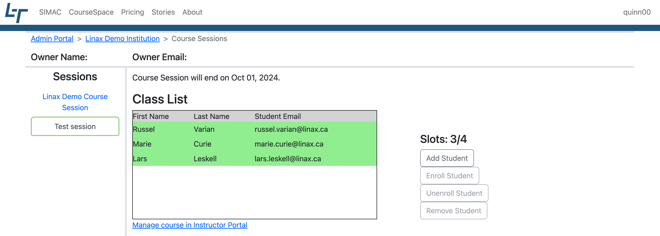
Classes are managed through the “Student Management Portal” found in the top right-corner drop-down. Clicking through to the portal shows a list of your classes; select any class to see the class list, number of slots available and other info about the class.
The class list
Students shown in green have working access. “Invitation Pending” means the invite has been sent but not yet accepted.
A class list with its student roster and available slots.
Inviting students
1
Click “Add Student”.
2
Enter the student's name and click “Add Student”.
3
The email appears in the class list marked “Invitation Pending”. Tick the checkbox when entering the email to be notified when they accept.
Inviting a student does not grant access on its own — they still need to accept and be enrolled.
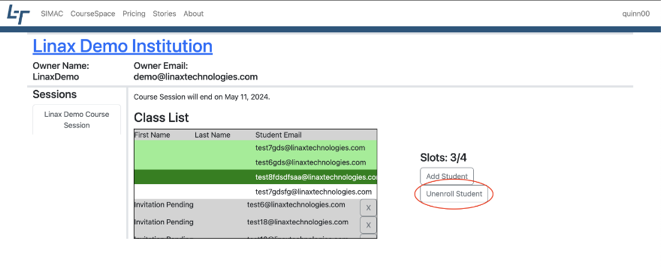
Add Student, Enroll and Unenroll Student beside the class list.
Unenrolling vs removing
Unenroll Student
Select the student and click Unenroll Student. They lose access to the content, but can be enrolled again without accepting a new invitation.
Remove Student
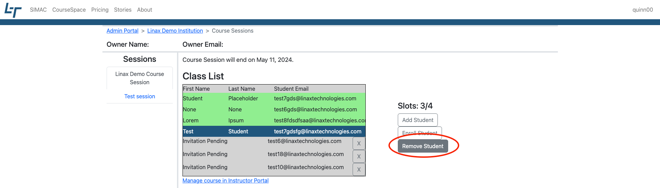
The student disappears from the class list entirely. To enroll them again they must be re-invited.
Instructors
Select “Instructors” in the sessions list and invite or unenroll them just like students; they turn green when access is working. Instructor accounts get Manager features and access to all available sessions.
Remove Student takes the student off the class list altogether.
Linax Technologies Ltd.
Manager Guide
Students Grades — grading & feedback
MANAGER · 03
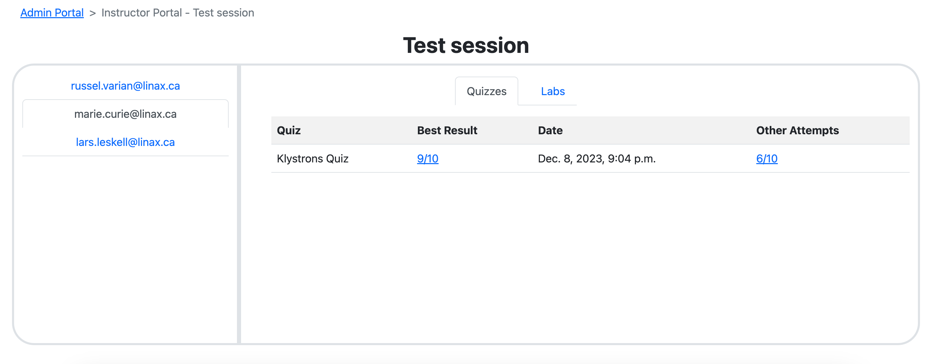
The instructor portal lets the manager see the grades and progress of their students.
Getting there
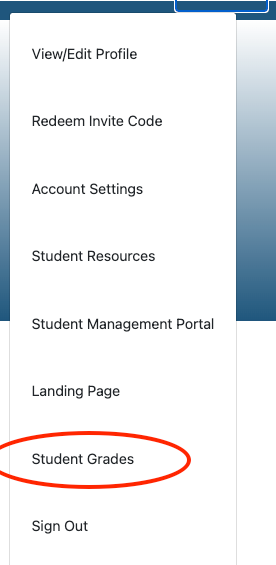
Reach it from “Student Grades” in the top-right drop-down, or from a class list page via “Manage course in Instructor Portal”.
You will see a list of students in the class, with tabs for quizzes and labs.
Top-right drop-down → Student Grades.
Quiz grading
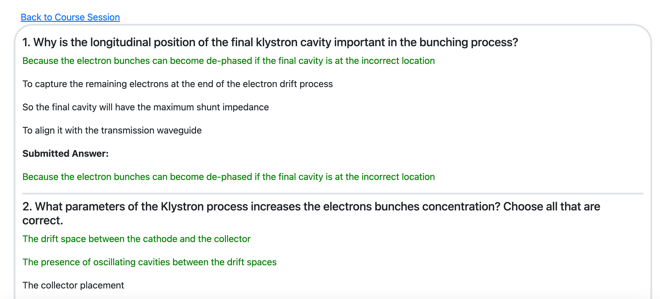
The Quizzes tab lists each student's best result and their other attempts. Select a result to see their answer to every question alongside the correct one.
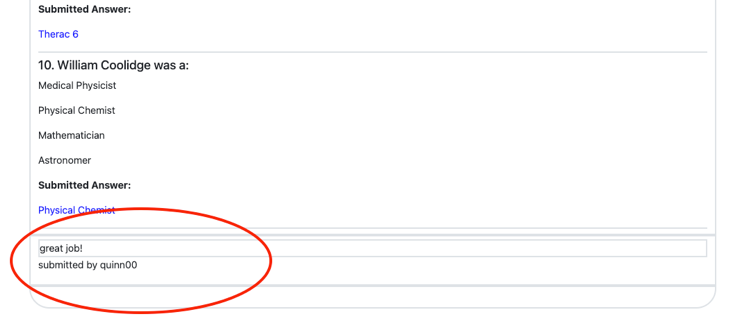
You can leave feedback on the quiz at the bottom of the quiz result.
Best Result and Other Attempts per quiz.A result opened up, showing the submitted answers.
Lab grading
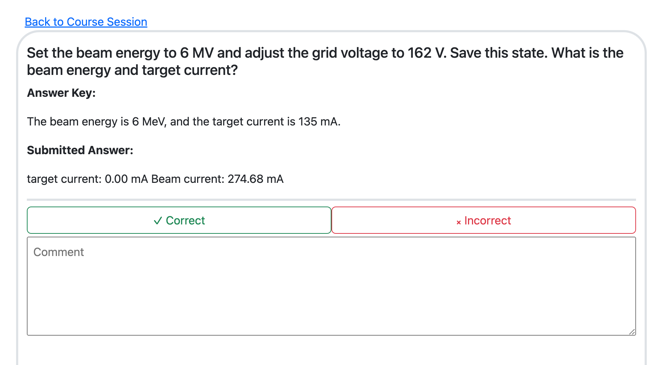
Select the Labs tab, then a lab, to open the student's attempt. You can see their answer, mark it correct or incorrect, and leave a comment.
A lab attempt with the answer key, Correct / Incorrect and a comment box.
Answer keys & release dates
1
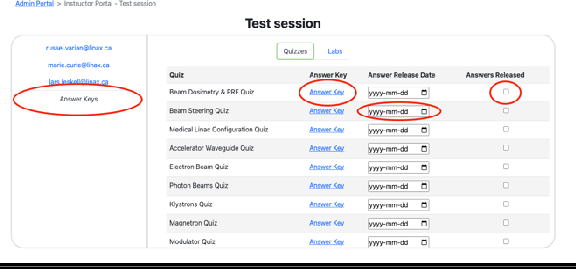
Open the instructor portal for a session and click the “Answer Key” tab — every quiz and lab answer key is here.
2
Tick “Answers Released” to let students see the answers right away.
3
Or choose an “Answer Release Date” to release them at 12 am on that date.
By default, students cannot see quiz and lab answers.
The Answer Key tab, with release dates and the Answers Released toggle.Feedback you leave appears under the student's submitted answer.
Linax Technologies Ltd.
Manager Guide
Course content & syllabi
MANAGER · 04
What your subscription includes, chapter by chapter, plus the Simac lab and procedure catalogue.
Linac Operational Theory textbook
Chapter
Topics
1 · Accelerator waveguides
Introduction · Direct acceleration · Series adding of electron energy · Waveguides · Phase velocity and guide wavelength · Wave impedance · Acceleration timing · Real accelerator structures · Standing wave and travelling wave accelerating waveguides · Energy switch · Summary · Quiz
2 · Electron Beams
Electron path through the medical linac · Gun emission · Electron energy gain · Bending magnet · Summary · Quiz
3 · Photon Beams
Classical and quantum mechanical theory of bremsstrahlung · Energy dependence of angular photon distribution · Thin and thick targets · Thick target spectrum · Beam quality specification · Bremsstrahlung directional dependence and production efficiency · Bremsstrahlung in SIMAC · Beam flattening · Energy dependence of beam flattening and flatness · Beam symmetry
4 · Medical Linac Configuration
Medical linac configurations · Treatment head configuration · Linac mode configuration
5 · Beam Steering
Beam symmetry · The Elekta beam steering system
6 · Beam Dosimetry & PRF
Ion chambers in medical linacs · Ion chamber current collection · Linac calibration · Dose rate control · Dose rate servo
7 · Klystrons
Microwave power sources · Klystron overview · Mode of operation · Bunching process · Klystron saturation · Klystron modelling · Magnetic focusing · Klystron construction
8 · Magnetrons
Mode of oscillation · Magnetron anode and RF · Resonant modes · Mode separation · Magnetron cathode · Bunch formation in rotational motion · Output coupler and frequency tuning · Magnetron operating values
Pulse timing in a medical linear accelerator · Pulsed nature of the linear accelerator · Relationship between gun injection, reflected RF power and beam output
Physics Quality Assurance textbook
Chapter
Topics
1
Maintaining the Quality of Radiotherapy Treatments
2
Quality Assurance Protocols
3
Frequency of Quality Assurance Testing
4
Return to Service Process
5
Repairs and Return to Service
6
Water Tank Measurements
7
Beam Flatness and Symmetry
8
Adjusting Beam Symmetry — the Varian steering system · the Elekta steering system
9
Description of QA Tests — output constancy · radiation to light field coincidence · isocentre · treatment table · laser alignment · optical distance indicator · dosimetric leaf gap · picket fence test
10
Instruments for Linear Accelerator QA — ion chambers and electrometers · water and solid water phantoms · ion chamber arrays · devices for VMAT and patient-specific measurements
SIMAC linac system labs
Beam Loading
Energy Correction with Bending Magnet
Flattening Filters
Beam Steering Part 1
Beam Steering Part 2
Adjusting the RF Driver
Adjusting the Klystron Pulse Voltage
Beam Finding
SIMAC linac component labs
The PFN charging cycle
The de-spiking circuit
Magnetron output power
RF reflected pulse
Electron Gun
Beam loading for travelling wave accelerator with diode gun
Beam loading for standing wave accelerator with triode gun
RF feedback phase adjustment for travelling wave accelerator
Steering for 270 degree bend magnet
Steering for slalom style bending magnet
270 degree bending magnet
Slalom style bending magnet
Klystron pulse voltage
Electron beam angle of incidence on target
Effect of feedback loop on travelling wave load line
Effect of energy switch on load line for a standing wave accelerator